- Text Field
- Text Area
- Select
- Radio Button
- Checkboxes
- File Upload
- Submit Button
- Form Title
- Number Field
- Date Field
- Range Field
Are you sure?
This will erase the form!
 Get the code
 Download Zip
 Use the buttons on the left to add fields to your form
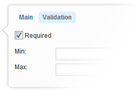 Clicking the edit icon (while hovering over a field) will bring up the field settings dialog. Use this dialog to set all the field properties, including label, name, and validation rules
 This will enable "preview mode" so you can test the validation rules for your form
 Click to download your form. You can choose to view the resulting code or download a zip
 The clear button will remove all existing fields from the form